
Eye Tracking & Placement
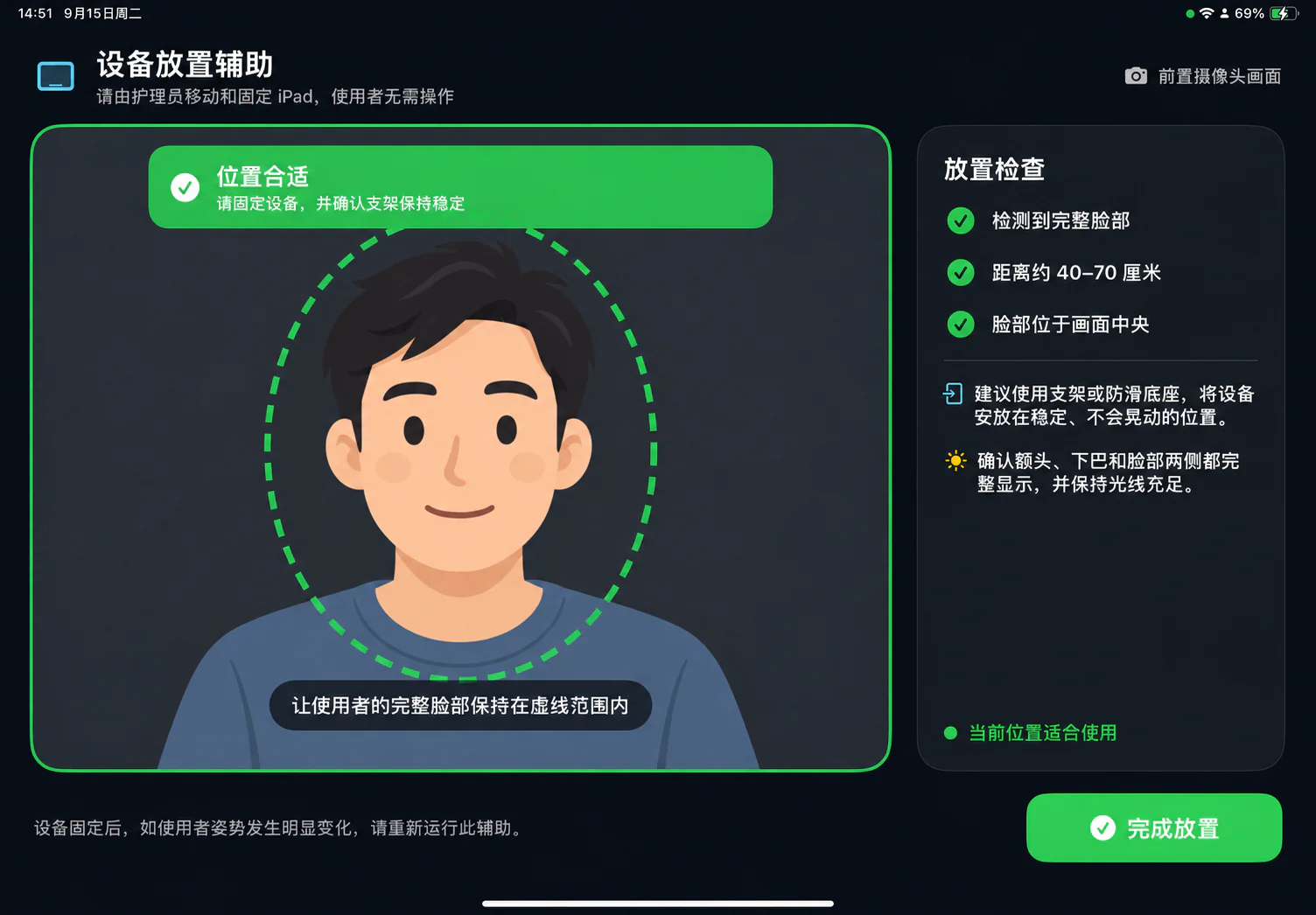
Placement Assistant
The "Placement Assistant" presents a live camera view with real-time feedback evaluating face completeness, centering, and optimal distance.
- Maintain an optimal distance of approximately 40–70 cm between the user and the iPad.
- Ensure the forehead, chin, and both sides of the face are fully visible and centered in the frame.
- Mount the iPad securely on a stable stand to prevent wobbling, and ensure adequate, even ambient lighting.
6-Point Calibration
Calibration proceeds through six targets in sequence: Center → Top-Left → Top-Right → Bottom-Right → Bottom-Left → Center. Each target provides a 1-second fixation window followed by 1.5 seconds of sample acquisition. If lighting drops significantly, calibration automatically pauses until conditions improve.
The top-left corner of the home screen provides direct access to "Calibrate". Caregivers can also trigger calibration via "Settings → Advanced → Re-calibrate Gaze Now".
Automatic Re-calibration
Auto re-calibration is enabled by default. The system monitors:
- Sudden shifts or tilting of the iPad device.
- Significant changes in user head pose or seating position relative to the screen.
- Absence of a detected face for extended periods.
- Re-entry of a different individual after a brief absence.
- Reaching routine periodic maintenance intervals.
To avoid interrupting ongoing sentences, automatic re-calibration prompts are scheduled when the user is idle on the home screen.
Gaze Dwell & Off-Screen Tracking
- Gaze dwell selection duration is adjustable from 2 to 10 seconds (default: 3 seconds).
- Advanced settings allow fine-tuning of eye-closure thresholds, continuous blink debouncing, and off-screen gaze tolerances.
- Returning to the home screen after looking away triggers a full refresh of AI suggestions if the idle duration exceeds the configured interval (default: 5 minutes, adjustable from 1 to 60 minutes).
Troubleshooting
Gaze Drift / Inaccurate Fixation
- Launch the "Placement Assistant" to verify face completeness, centering, and distance (40–70 cm).
- Stabilize the iPad mounting bracket and eliminate harsh backlighting.
- Perform a fresh 6-point gaze calibration.
Frequent Accidental Selections
- Increase the gaze dwell selection time to 4–5 seconds under "Settings → General".
- Reposition ambient room lamps to prevent glare on eyeglass lenses or deep facial shadows before re-calibrating.
Camera Unavailable
Select "Continue in Touch Mode", and have a caregiver inspect camera permissions and hardware support under "Settings → Device Status".