
Quadrant Navigation
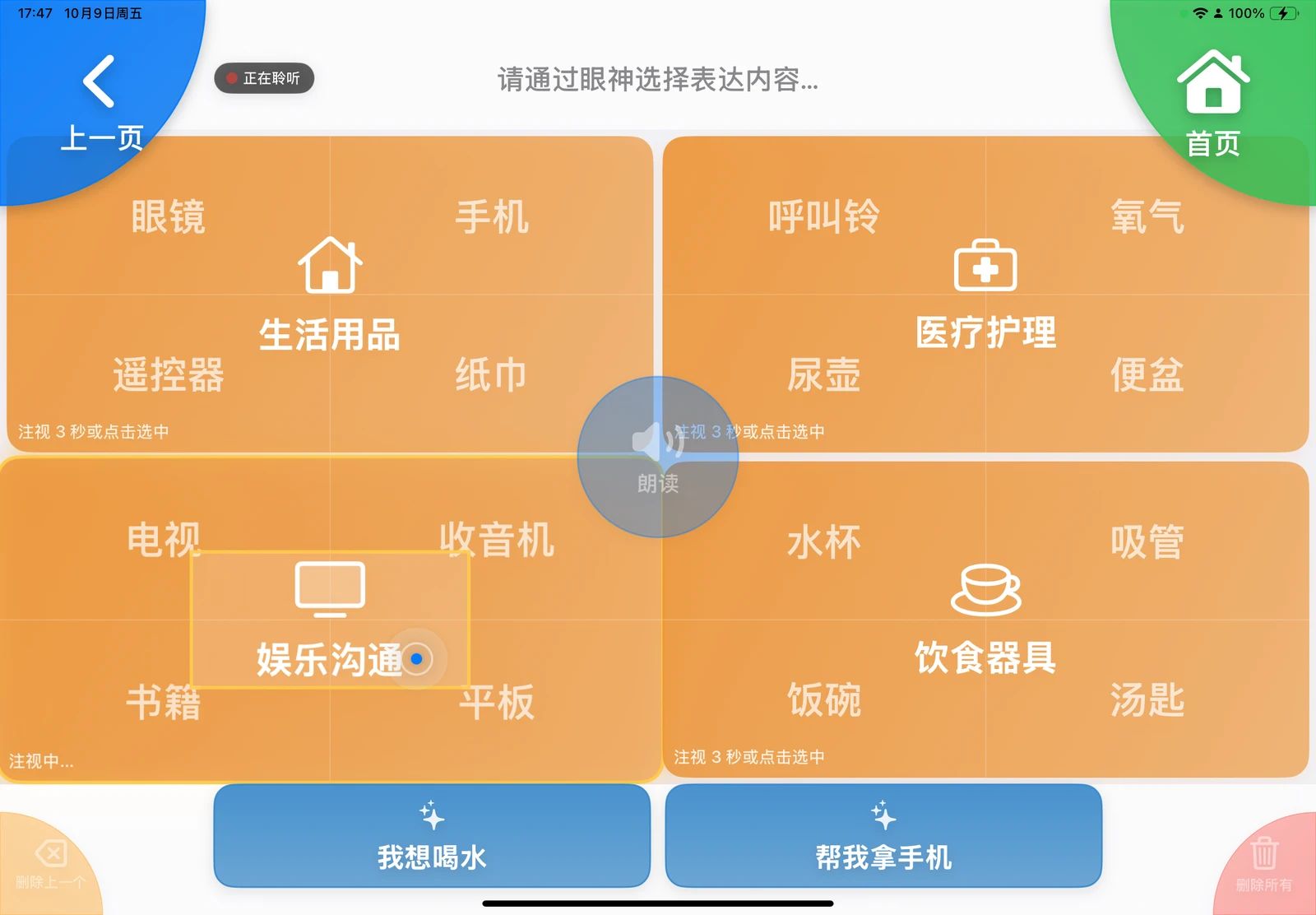
Selection Methods
- Gaze Dwell: Look at the target area and hold your gaze until the selection progress fills completely. The default duration is 3 seconds, adjustable between 2 and 10 seconds under "Settings → General".
- Direct Touch: Tapping any target selects it immediately. This is ideal for caregiver demonstrations, assisted interaction, or when operating without camera tracking.
Selecting an intermediate category expands it full-screen to display the next level. Selecting a final leaf node appends that phrase to the top bar and returns to the home screen.
Categorized Expressions
"Categorized Expressions" supports up to 64 editable phrases and includes four default categories:
- Body: Head, Chest, Legs, and Hands, subdividing into specific regions such as eyes, lungs, knees, fingers, and more.
- Objects: Daily essentials, medical care, communication & entertainment, and dining utensils.
- Sensations: Physical needs, comfort adjustments, requests for assistance, and general state feelings.
- Daily: Ambient environmental controls, resting postures, hygiene & care, and social interactions.
Names, icons, groups, and phrases can be changed under "Settings → Expression Content".
Example Path: Categorized Expressions → Sensations → Comfort Adjustments → Turn Over.
Frequent Phrases
"Frequent Phrases" supports up to 16 phrases configured by caregivers under "Settings → Expression Content". Default factory templates include Meals & Drinks, Posture, Daily Requests, and Family Names, all fully customizable. For details, see Expression Content.
AI Suggestions & Recents
- When AI is active and daily quota remains, the fourth quadrant displays "AI Suggestions" with 4 preloaded contextual phrases.
- When AI is disabled or daily quota is depleted, this quadrant automatically transitions to "Recents", displaying deduplicated historical phrases sorted by most recent speech. Users can browse up to 10 past phrases via "More History".
Practical Tips
- When starting out, set the gaze dwell duration to 4–5 seconds to build confidence before shortening it.
- If an unintended phrase is selected, gaze at the bottom-left corner to "Delete Last". If you entered the wrong sub-category, look at the top-left corner to go "Back".
- To reset navigation from any sub-level, gaze at the top-right corner to return directly "Home".