AI Suggestions & Recents
AI Suggestions are designed to minimize repetitive navigation through category trees. This feature is disabled by default and requires explicit caregiver consent via the third-party data sharing disclosure prior to activation.
Two Prediction Channels
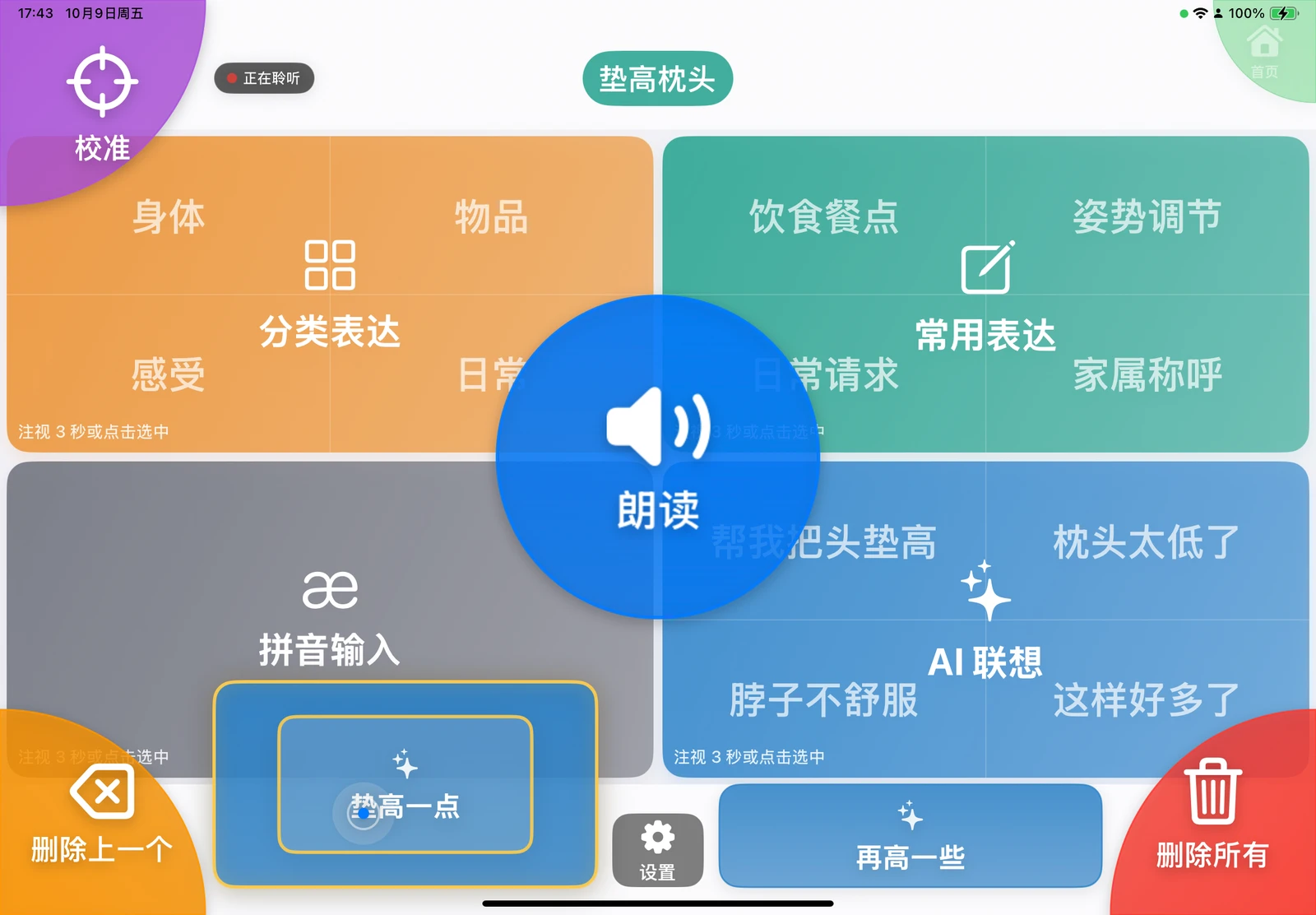
- Bottom Quick Predictions: Two buttons at the bottom-left and bottom-right corners, dynamically refreshed according to the current sentence, active expression category, or Pinyin branch.
- Fourth Quadrant AI Suggestions: The home screen preloads up to 4 contextual candidates in the bottom-right quadrant. Entering this quadrant displays the preloaded items without additional delay; selecting an item appends it to the top bar, provides optional speech feedback, and returns home.
Contextual Inputs Considered
Suggestions are tailored using authorized and currently available inputs, including:
- Assembled sentence text, active category, or Pinyin phonetic branch.
- Age group, gender, medical/nursing restrictions, caregiver relations, daily medications, preferred foods, and residential environment.
- Caregiver keywords, historical high-frequency phrases, and recently vocalized phrases from the past 15 minutes.
- Current time of day, approximate geographic location, and local weather summary.
- Text transcripts and ambient sound summaries if "Caregiver Speech Listening" has been explicitly enabled.
For comprehensive details on transmitted fields, see the Privacy Policy.
Refresh Triggers
- Returning to the home screen from Settings, Calibration, or any sub-quadrant page triggers a full refresh of both bottom predictions and fourth-quadrant suggestions.
- Entering a standard expression category or Pinyin screen refreshes only the bottom quick predictions.
- Entering the fourth quadrant displays preloaded suggestions immediately without triggering a duplicate network call or blank loading state.
- When the user's gaze returns to the home screen after looking away, and the elapsed time since the last full refresh exceeds a configurable threshold, a full refresh is performed. The default threshold is 5 minutes, configurable from 1 to 60 minutes under "Settings → Advanced".
Daily Quota & Subscriptions
- The app checks available daily AI quota prior to making calls to prevent redundant requests when the limit is reached.
- Under "Settings → Subscriptions", caregivers can check remaining requests for the day, view active subscription status and live pricing, or restore previous purchases. Quota resets daily at 00:00 (UTC+8).
- When AI is disabled or daily quota is exhausted, the fourth quadrant automatically switches to on-device "Recents" without initiating network requests. Once quota is restored, it transitions back to "AI Suggestions" and performs a full home refresh.
AI Privacy History
"Settings → AI Prediction History" records field summaries and timestamps for recent AI requests locally on the device for 7 days. Entries are organized by date, do not store full raw prompt text, and can be cleared at any time.